Resource Views
26 resource list views with search, pagination and live metrics, plus Namespaces, Events, cluster RBAC and Helm releases, and a tabbed detail page for every object.
Supported resources
KubeBolt has 26 resource list views, grouped in the sidebar the same way as below. Each supports search, namespace filtering, server-side pagination (50 per page) and, where it applies, live CPU and memory from Metrics Server.
| Sidebar group | Resources |
|---|---|
| Pinned | Pods, Nodes (plus Insights and Applications) |
| Workloads | Deployments, StatefulSets, DaemonSets, Jobs, CronJobs |
| Traffic | Services, Ingresses, NetworkPolicies, Cilium Policies (CiliumNetworkPolicies), Cilium Cluster Policies (CiliumClusterwideNetworkPolicies), PodDisruptionBudgets, Gateways, HTTPRoutes, Endpoints (EndpointSlices) |
| Storage | PersistentVolumeClaims, PersistentVolumes, StorageClasses |
| Config | ConfigMaps, Secrets (keys by default — values only through the audited reveal), Service Accounts, HorizontalPodAutoscalers |
| Extensions (CRDs) | cert-manager Certificates, Argo CD Applications, VerticalPodAutoscalers |
The Cluster group adds three views that aren’t plain lists: Namespaces, Events, and RBAC (ClusterRoles and ClusterRoleBindings). Extension and Cilium views show up with data only when the CRD is installed; a missing CRD is reported as a neutral “not detected” note, not as a permission problem. ReplicaSets have no list of their own — they appear in a Deployment’s history, the Related tab and the Cluster Map.
Applications lists the Helm releases in the cluster — status, chart, values, manifest, notes, the resources a release owns and its revision history. It is read-only: KubeBolt does not install, upgrade or roll back Helm releases.
Resource detail views
Each resource has a tabbed detail page at /:type/:namespace/:name (_ stands
in for the namespace of cluster-scoped resources). Available tabs vary by type:
| Resource | Tabs beyond Overview, YAML and Events |
|---|---|
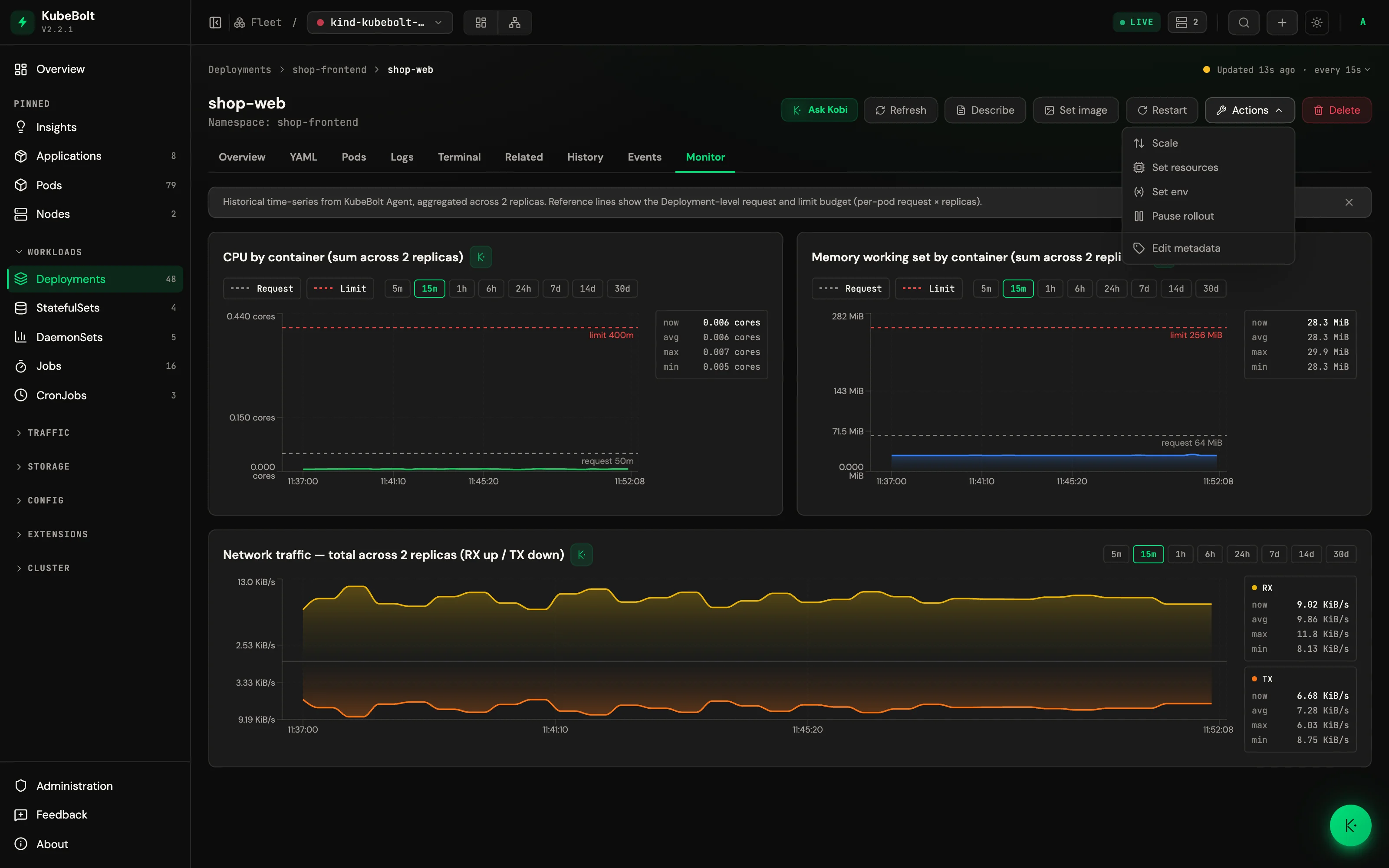
| Pods | Containers, Logs, Terminal, Files, Volumes, Related, Monitor |
| Deployments, StatefulSets, DaemonSets | Pods, Logs, Terminal, Related, History, Monitor |
| Jobs | Pods, Logs, Related |
| CronJobs | Jobs, Related |
| Services | Related |
| Nodes | Pods, Monitor |
| NetworkPolicies, Cilium policies, PodDisruptionBudgets | Matched Pods, Related |
| PersistentVolumeClaims | Monitor |
What each tab does:
- Overview — Key fields, status, conditions, labels, annotations
- YAML — Syntax-highlighted definition with copy/download/edit. Secret
datavalues always come back asREDACTED, and ConfigMap values are redacted too when the key or the value looks like a credential.managedFieldsand thelast-applied-configurationannotation are stripped. - Pods — The pods a workload or node owns
- Logs — Pod and workload logs with pod and container selectors, tail lines (100/500/1000), 10s auto-refresh
- Terminal — WebSocket-to-SPDY exec bridge with xterm.js; on workloads, pick the pod first
- Files — Exec-based file browser with directory navigation, content viewer and download (Pods only — open a pod from a workload’s Pods tab to browse it)
- Containers — Container specs, env vars, ports, mounts (Pods only)
- Volumes — Volume mounts and claims (Pods only)
- Related — Parent and child resources from topology edges
- History — Revision history via ReplicaSets (Deployments) or ControllerRevisions (StatefulSets, DaemonSets), with roll back to a revision (editor role)
- Matched Pods — The pods a policy or PDB actually selects
- Events — Events filtered to the specific resource
- Monitor — CPU and memory gauges from Metrics Server, plus history charts (CPU and memory by container, network traffic, filesystem on nodes) when the agent ships metrics; PVCs show space and inode usage from kubelet volume stats
Revealing a Secret value
The YAML view never shows Secret values. When you actually need one — validating
a rotation, say — there is a separate, deliberately narrow path instead of
dropping to kubectl get secret -o yaml | base64 -d:
POST /api/v1/resources/secrets/{namespace}/{name}/revealIt is designed to be auditable rather than convenient:
POST, notGET. A reveal returns sensitive payload and emits a side effect.GETis cacheable by every layer in between;POSTis not.- Read from the apiserver, not the informer cache. A reveal has to show the post-rotation value, not a cached one, so it costs one apiserver round-trip.
- A written reason is required, between 10 and 500 characters. It goes into the audit record, not into the response.
- Editor or above, enforced at the route. For namespaces matching the
production pattern (
^(prod|production|prd)([-_].+)?$by default, editable in Administration → System → General or viaKUBEBOLT_PROD_NAMESPACE_PATTERN) the handler escalates the requirement to Admin, and a denied attempt is audited too. - Two audit records per reveal — one on the general action log, next to
restarts and scales, and one on a dedicated secret-reveal channel carrying the
reason, the requested keys, the actor, and the outcome
(
success·denied_prod_namespace_requires_admin·not_found·apiserver_error). - Neither record ever contains a value, a hash of a value, or anything derived from one. Values exist only in the response body and are never persisted server-side.
Request body: {"keys": ["…"], "reason": "…"}. Omitting keys reveals every
key and audits the breadth as <all>. Values that are not printable UTF-8 come
back as a sha256 plus a byte count rather than as garbled text.